Insane
Number - 1

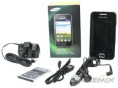
Inside the box you can find: a Samsung Galaxy Ace Phone, of course, a battery, a charger, a handsfree, and a user’s guide.
Galaxyace review 01
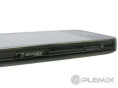
On the right you can find the power/lock key (like most Samsung phones do),and the micro SD card slot(up to 32GB, 2GB in box ) under a plastic lid.
Galaxyace review 05
On the top side of Galaxy Ace you can find the microUSB port with a retractable lid (for charging and data) as wellas the standard 3.5mm audio jack.
it's look-a-like, the iPhone 4. While itisn't supposed to competewith the iPhone, you can certainly see the similarities, right down to some of Samsung's TouchWiz customisations. While that may not be a bad thing, the Ace is good enough to deserve some unique design touches to make it different.
Some may find the side located sleep/wake buttonslightly strange, but it's very easy to get used to.

the Ace supportsWiFi N as well as b/g. If you're running a wireless network on the N standard, theoretically you'd be experiencing much faster connection speeds. It's only just starting to feature on high-end devices, so to see a phone with such a modest price tag include ab/g/n WiFi chip is almost unheard of. Well done Samsung .

If you've seen the old iPhone's display, you've seen the Galaxy Ace display. It has no problems with brightness or contrast, even outside, but the 320x480 display does lack the crispness seen on higher resolution displays. Again,it was probably a cost saving decision to go withthis screen, but it's still perfectly usable. Reading a lot of zoomed out text or watching movies won't be ideal on this phone butfor everything else, the screen is more than adequate for a midrange phone.

The Galaxy Ace is the littlebrother to the Galaxy S
+Extra back cover (gloss white)

+1350mAh battery

+Earphones

+USB to micro USB cable

+USB wall charger

+Manuals & documentation

and more!!

the Galaxy Ace comes with theusual array of Google apps - Market, YouTube and Maps. The Market is your gateway to all the applications that Android has to offer, from games to Tube maps. After signing in with a Google account, you can view categories of apps and games, sorting them by paid for or free. The YouTube app is also whatyou'd expect; the front page shows you popular and featured videos muchlike its desktop counterpart, while also giving you the ability to search for specific videosor upload your own directly from the phone. Loading up a video is quick and stress free, leaving you to sit back and enjoy.
Today's incarnation features more than just amap you can pan around on. Diving a bit deeper into the settings allows you to plan routes with very extensive options, as well as the more socialaspects of your location with Places and Latitude. In fact, Google Maps has come so far that they nowhave free full navigation. You can plan a route and it will guide you with full voice directions. As long as you're happy with using the Galaxy Ace and it's 3.5" display as a GPS, it will certainly do the job.

The Galaxy Ace sports a 5MP autofocus camera, which while it may not match to the 8MP and 12MP snappers of the high end world, it's certainly decent enough to take good pictures. The interface is quite simple to use too. There are plenty of camera settings for you to tweak,all easy to find. There area selection of shooting modes which can come in handy - not sure about the smile shot though; theface detection is pretty slow. There are preset scene modes too which alter picture settings to make your phone look best in different settings like at night or indoor. If none of these are to yourliking, you can have manual control of settingssuch as white balance, ISO etc.

TouchWiz customisation are the quick access buttons that live in the notification bar,which can be accessed bydragging down from the top. The added toolbar allows you to quickly turn on and off WiFi, Bluetooth, GPS, ringer, and auto rotate - much easier than having to go deep into the settings menus to reach them.

Allshare is basically a media sharing application which allows you to sharepictures, video and audio.Files can be played from the phone directly to another device supporting DLNA, or alternatively media can beplayed from another device to the Galaxy Ace (must go through a WiFi router or server that it's connected to). Almost every manufacturer has their own application which essentially does thesame thing, and unsurprisingly, the Allshare app streams justas well as the others. There's not much to say here as the interface is pretty bare, and buffer times vary depending on your network speed.

All around support

Allshare, Task Manager and available RAM, ThinkFree Office, and FM Radio,Android Market, YouTube application, Google Maps,Swype keyboard, with various other symbols and options,Camera shooting mode and scene mode and more!